Turn two versions of an SOP into a change summary in seconds
RevisionProof finds every change between two versions of a Word document, including tables, formatting and moved paragraphs, and lays them out section by section with the previous and new wording, ready to paste into your change control form. It runs entirely on your computer, so nothing is uploaded.
Free to use. No account, no upload, no install.
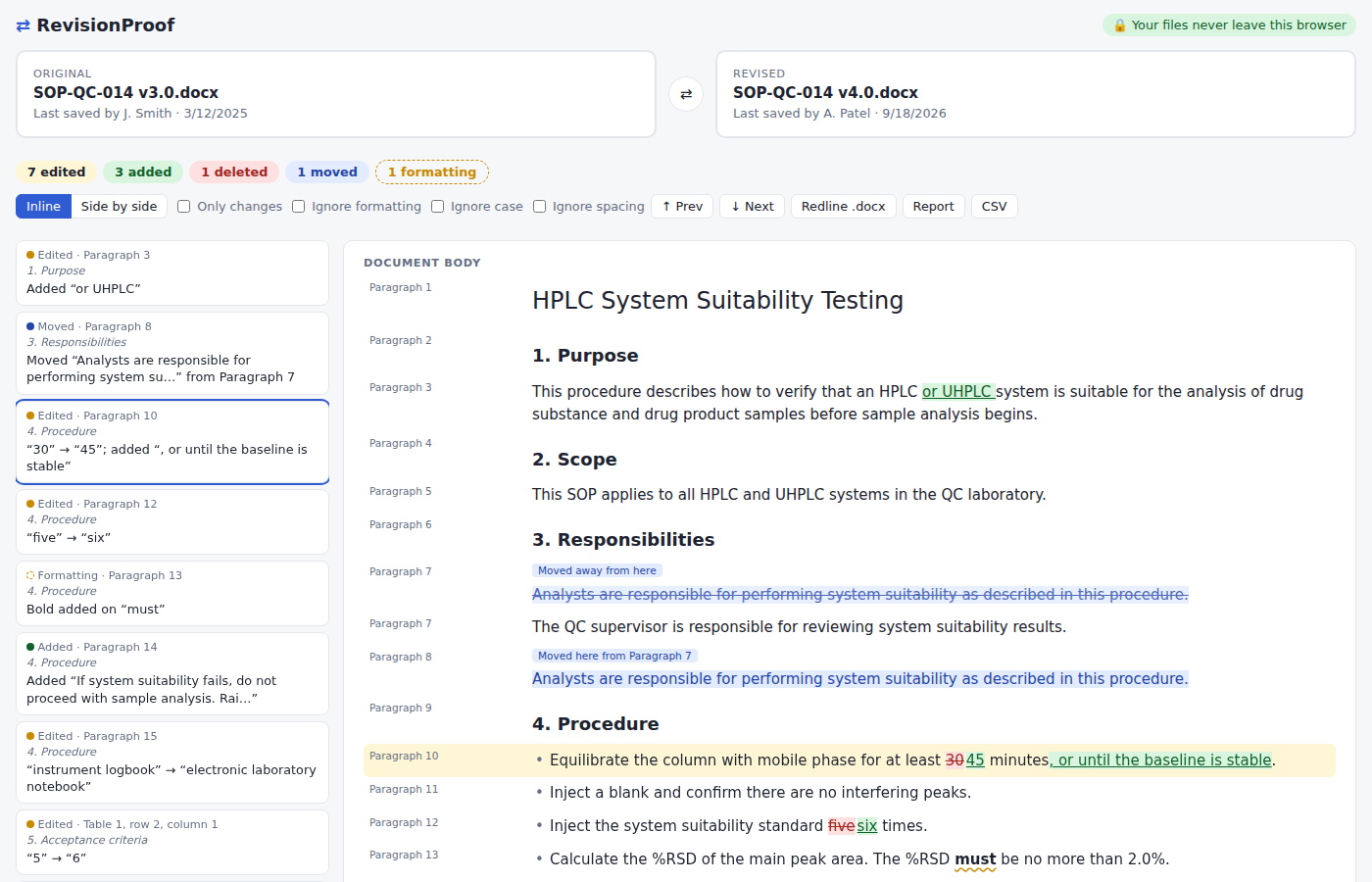
Built to catch what a quick read misses
A changed limit in a table cell, a step that moved, a word made bold. RevisionProof lists every difference with where it is and which section it sits in.
Word-level edits
Numbers, dates and codes stay whole, so you see 2.01.8 rather than scattered digits.
Moved paragraphs
Reordered steps show as moves, not as a deletion in one place and a mystery addition in another.
Tables, cell by cell
Acceptance criteria and specification tables are compared per cell, with row and column shown.
Formatting changes
Bold, italic, underline, font, size and colour changes, plus style, alignment and list level.
The whole document
Headers and footers, footnotes, endnotes and comments, not just the body text.
Images
Replaced pictures are flagged, even when the surrounding text is identical.
From two versions to a change control record
Comparing is the easy part. Writing up what changed for the change request, the training record or the auditor is what takes the afternoon. RevisionProof does that write-up for you.
| No. | Section | Type | Previous wording | New wording | Reason for change |
|---|---|---|---|---|---|
| 3 | 4. Procedure, Paragraph 10 | Edited | Equilibrate the column with mobile phase for at least 30 minutes. | Equilibrate the column with mobile phase for at least 45 minutes, or until the baseline is stable. | |
| 4 | 4. Procedure, Paragraph 12 | Edited | Inject the system suitability standard five times. | Inject the system suitability standard six times. | |
| 9 | 5. Acceptance criteria, Table 1, row 3, column 2 | Edited | Tailing factor limit: ≤ 2.0 | Tailing factor limit: ≤ 1.8 |
Change summary
Every change as a Word table: section, previous wording, new wording and a blank column for the reason. Download it, or copy it straight into your change control form.
Redline .docx
The revised document with every change as real Word tracked changes, ready for reviewers to step through and accept.
Change report
A printable PDF listing each change with its location and section, plus both files' SHA-256 hashes so the report ties to exact versions.
CSV change list
Drop the changes into a change control form, spreadsheet or impact assessment.
Private by design, not by promise
Most online comparison sites upload your files to their servers. RevisionProof never does.
Compared on your computer
Your browser reads the two .docx files and compares them locally. There's no server that receives documents.
Blocked from sending data
The compare page ships with a security policy that stops it making network requests at all, so it couldn't upload a file even by mistake.
Check it yourself
Open your browser's developer tools, go to the Network tab and run a comparison. You'll see nothing sent.
How it compares
| RevisionProof | Word's built-in Compare | Typical online diff sites | |
|---|---|---|---|
| Change summary table for change control | Yes | No | No |
| Documents stay on your computer | Yes | Yes | No, files are uploaded |
| Works in any browser, nothing to install | Yes | Needs Word | Yes |
| Change list with section headings | Yes | Revisions pane only | Varies |
| Printable report with file hashes | Yes | No | Rarely |
| Redline .docx with tracked changes | Yes | Yes | Usually paid |
| CSV change list for spreadsheets | Yes | No | Rarely |
Questions
Why not just use Word's Compare?
Word's Compare is good at producing a compared document, and RevisionProof can make one too. What Word doesn't give you is the next step: a clear list of what changed, section by section, with the old and new wording side by side, that you can drop into a change request, training record or audit response. That write-up is what RevisionProof is for.
Is it really private?
Yes. The comparison runs in your browser tab, and the compare page's security policy blocks all outgoing network requests. Your files aren't stored either: closing the tab clears them.
Which files can I compare?
Word .docx files. For older .doc files, open them in Word and save as .docx first.
What if a document already has tracked changes?
It's compared as if all its tracked changes were accepted, and RevisionProof tells you it did that.
Is it free?
The full on-screen comparison is free. A Pro plan for the change summary, redline, report and CSV exports is coming. Until then, those are free too during early access. See pricing.
Does it replace a controlled review?
No. It helps reviewers find every change quickly, but a person still decides whether each change is correct.
Compare your next revision in seconds
Drop in two .docx files. Nothing is uploaded.
Compare two documents